Simple POS
From $69.00
Self-hosted point of sale for small shops and cafés: touch sale screen, barcode scanning, cash and card payments (card amounts recorded, not processed), 80 mm and A4 receipts, stock, refunds, register sessions with variance and reports. English and Arabic.
- Secure payment via PayPal
- Instant digital delivery
- Clear licensing
- Support available
Overview
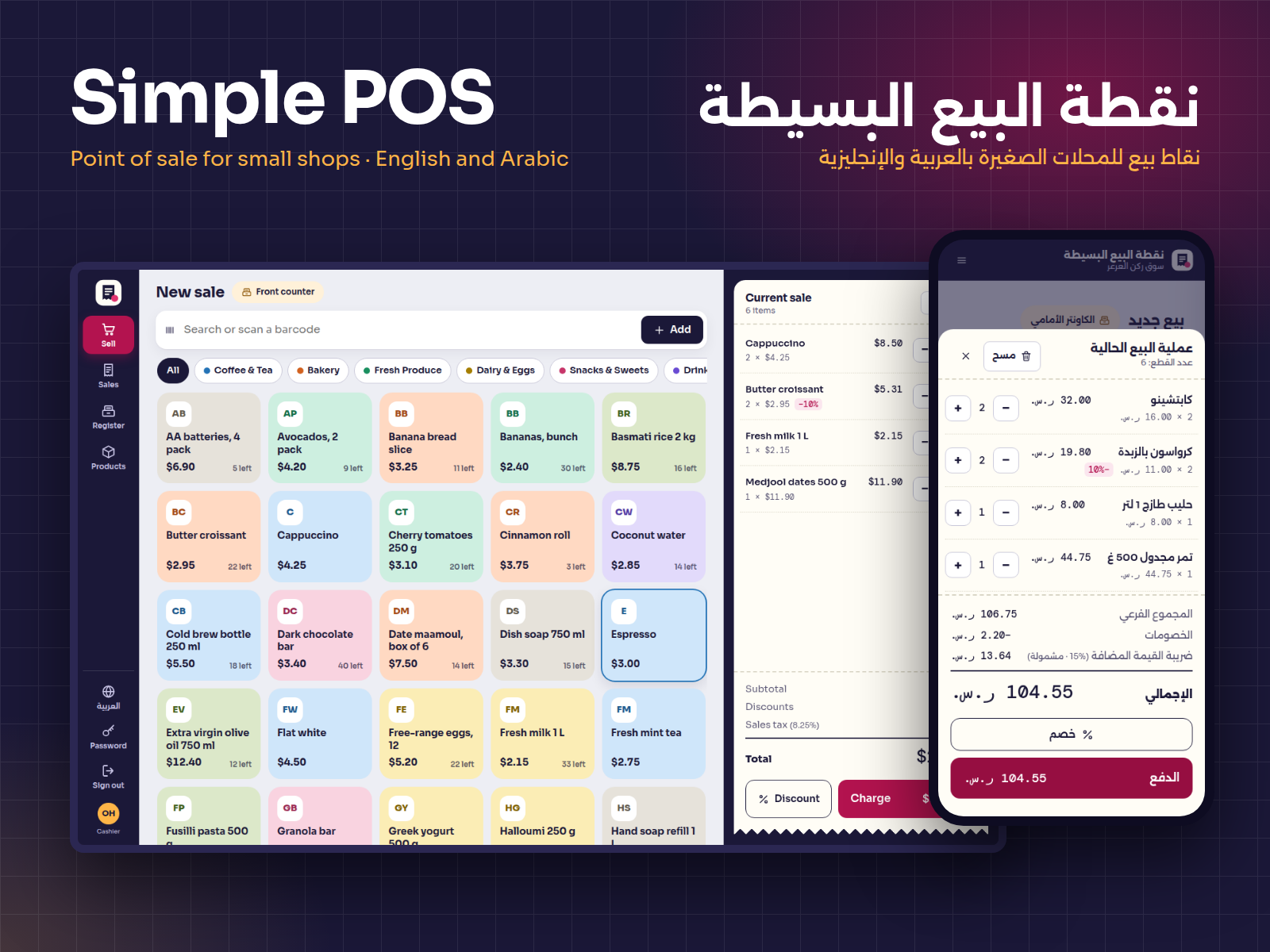
Simple POS is a ready-to-run point-of-sale web app for small shops, cafés, bakeries and kiosks. Install it on a computer at the counter or on your own server with Node.js, then sell from any current browser on a desktop, tablet or phone.
Built for the counter
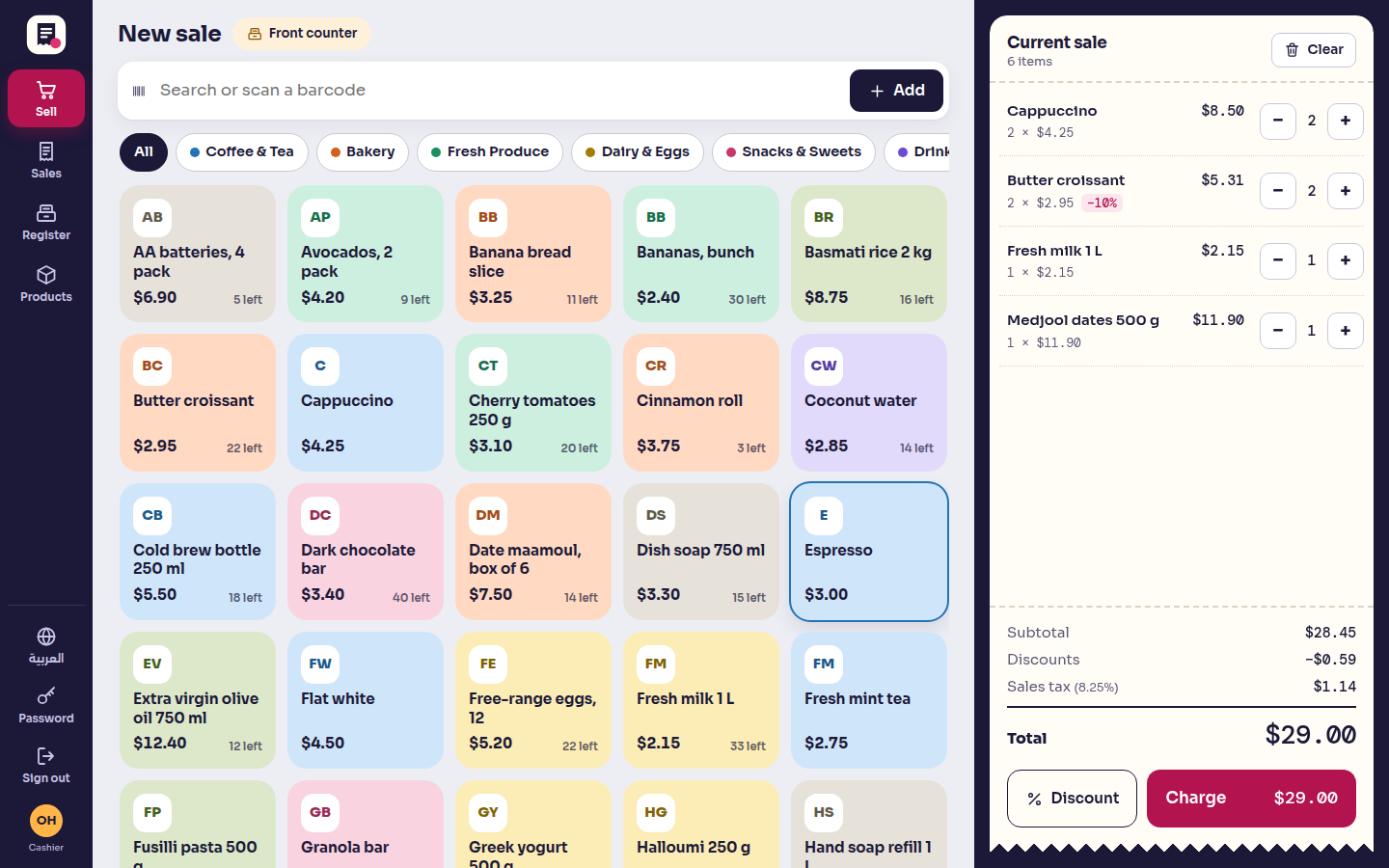
- A touch-friendly sale screen with product tiles by category, instant search and barcode scanning (any USB or Bluetooth scanner that types the code works).
- Line and whole-sale discounts, with a limit for cashiers that you set.
- Tax added at checkout or included in prices, worked out exactly once per sale.
- Cash, card or both in one payment, with the change calculated from the cash handed over. Card amounts are recorded, not processed: the customer pays on your own card terminal. The app does not connect to any payment service.
Receipts that print properly
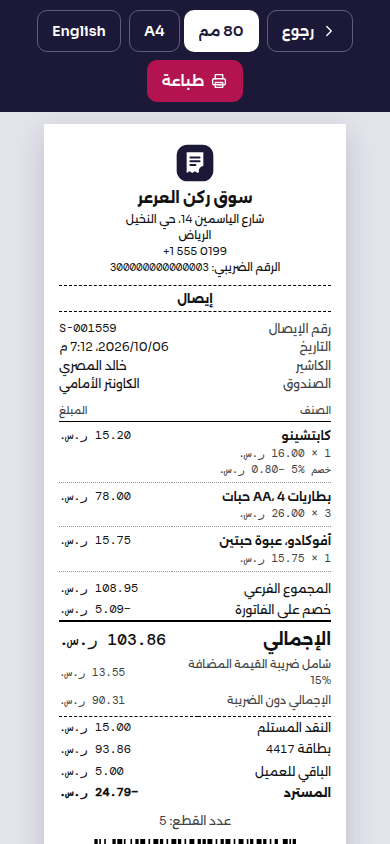
- 80 mm receipts for thermal printers and A4 invoices, in English or Arabic, with a barcode of the receipt number for quick refund lookups.
Cash you can account for
- Register sessions with an opening float, cash in and out, and a closing count. Cashiers count blind; the app records expected cash, counted cash and the variance.
Stock, refunds and reports
- Stock goes down with every sale; deliveries, stock counts and write-offs are logged.
- Full or partial refunds, paid in cash from the drawer or recorded as a card refund (made on your card terminal), with optional restocking and a numbered refund slip.
- Sales by day, by product (with cost and margin) and by cashier (with drawer variance), all exportable to CSV.
Two roles. Managers run everything. Cashiers sell, record cash in and out, and close their own drawer.
Money done right. Every amount is stored in whole cents (or halalas, fils), with one documented rounding rule and the same calculation on screen and on the server, so totals, change and variances always add up.
The interface is fully bilingual, with a real right-to-left Arabic layout, Arabic receipts and an Arabic sample shop. Your data stays in one SQLite file on your machine; the app makes no internet calls.
What's included
- Complete product files (ZIP)
Languages
The product files and designs come in these languages.
Features
- Touch sale screen: product tiles by category, search and barcode scanning
- Line and whole-sale discounts, by percentage or amount, with a cashier limit
- Tax added at checkout or included in prices, calculated once per sale
- Split payments: cash, card or both, with change worked out automatically
- Card amounts are recorded, not processed: customers pay on your own card terminal
- Printable 80 mm thermal receipts and A4 invoices in English or Arabic
- Receipt barcode for scanning a sale back up when refunding
- Full or partial refunds in cash, or recorded as card refunds, with optional restocking
- Products and categories with SKU, barcode, cost, tax setting and Arabic name
- Stock that goes down with each sale, plus deliveries, counts and write-offs
- Stock movement history and a low-stock list on the dashboard
- Register sessions: opening float, cash in and out, closing count
- Blind count for cashiers, with expected cash, counted cash and variance
- Reports by day (with chart), by product (with margin) and by cashier
- CSV export of reports, sales and products that opens correctly in Excel
- Manager and cashier roles; refunds and reports are manager-only
- Cart kept in the browser, so a reload or closed tab loses nothing
- Keyboard shortcuts: F2 for search, F9 for payment
- English and Arabic interface with a true right-to-left layout
- Exact money: whole minor units and one documented rounding rule
- Secure sign-in: scrypt passwords, one-time first passwords, CSRF protection and rate limiting
- Command-line setup, password reset and online backup scripts
- One SQLite file, one npm dependency, no compiler needed, no internet calls
Requirements
Node.js 22 or newer. Version 1.0.0 was tested on Linux (x64) and Windows (x64); its one runtime npm dependency, better-sqlite3, also ships prebuilt binaries for Windows and macOS (x64 and arm64), so no compiler or build tools are needed. Data is stored in a single SQLite file. About 30 MB of disk space after install. Fonts are bundled; the app makes no internet calls.
Compatibility
Uses standard web features of current Chrome, Edge, Firefox and Safari on desktop, tablet and phone. Tested in Chromium at 1440, 1024, 768 and 390 pixels wide in English and Arabic, and checked in Firefox and Safari's WebKit engine. Works with barcode scanners that act as a keyboard and with 80 mm thermal or A4 printers through the browser print dialog.
Installation
- Unzip
simple-pos-1.0.0.zipand open a terminal in thesimple-posfolder. - Run
npm install. - Run
npm run seedto create a sample shop (ornpm run seed -- --lang=arfor the Arabic sample with riyals and VAT). It prints one-time passwords for the manager and two cashiers. - Run
npm startand open http://127.0.0.1:4125. - Optional: run
npm testto check the installation.
For real use: run npm run setup -- --force to start from an empty shop with one manager account. To serve tablets on your network, set HOST=0.0.0.0 in .env. The README explains running it as a service on Linux or Windows, HTTPS behind Caddy or nginx, and backups.
User guide
Getting started
- Sign in as the manager with the printed one-time password and choose your own.
- In Settings, enter the shop name, address, currency, tax rate, whether prices include tax, and the receipt footer. Name your registers.
- Add Categories, then Products with price, barcode and stock.
- Under Users, add each cashier. Hand over the one-time password the app shows.
Selling
- Open a register and count the opening float.
- Tap tiles, search, or scan barcodes. Tap a line to change its quantity or give a discount.
- Press Charge (or F9), enter cash, card or both, and give the change shown.
- Print an 80 mm receipt or an A4 invoice.
End of day
- Go to Register → Close register and enter the counted cash.
- The app records the variance as balanced, over or short.
- Managers check Reports by day, product and cashier, and download CSV files.
Refunds (managers): Refunds → Find sale, scan or type the receipt number, choose the items, cash or card, and whether to restock.
License
| Personal$69.00 | Commercial$89.00 | Extended$299.00 | |
|---|---|---|---|
| Projects | 1 | 5 | Unlimited |
| Users or sites | 1 | 1 | 5 |
| Commercial use | Not allowed | Allowed | Allowed |
| Modification | Allowed | Allowed | Allowed |
| Resale | Not allowed | Not allowed | Not allowed |
| Redistribution | Not allowed | Not allowed | Not allowed |
| Updates | 12 months | 12 months | Lifetime |
| Support period | 6 months | 12 months | 12 months |
Pay with PayPal or a debit or credit card. We send your product once the payment is confirmed.
Support & Updates
Support is provided by TowerCaty through the contact details in your order email. Please include your order number, the app version (shown at the bottom of every page), your Node.js version and the steps that lead to the problem.
Changelog
1.0.0
- Version 1.0.0: first release in the store.
Last Updated
- Last update
- Oct 6, 2026
- Version
- 1.0.0