Project Management Templates for Excel & Word
$19.00
Project management templates for Excel and Word to run a project to closure: a WBS plan, a task tracker with dashboard, a weekly status report, a RACI matrix, issue, change, decision and action logs, and a closure report, in English, Arabic, French and Spanish.
- Secure payment via PayPal
- Instant digital delivery
- Clear licensing
- Support available
Overview
Project management templates for Excel and Word: eight connected files for running a project week by week, from the work plan and task assignments to weekly reporting and the closure report. Every file uses the same fictional sample project (an online store launch), so names, dates and numbers match across the pack. Replace them with your own project. Six Excel workbooks with real formulas and two print-ready Word documents.
The files
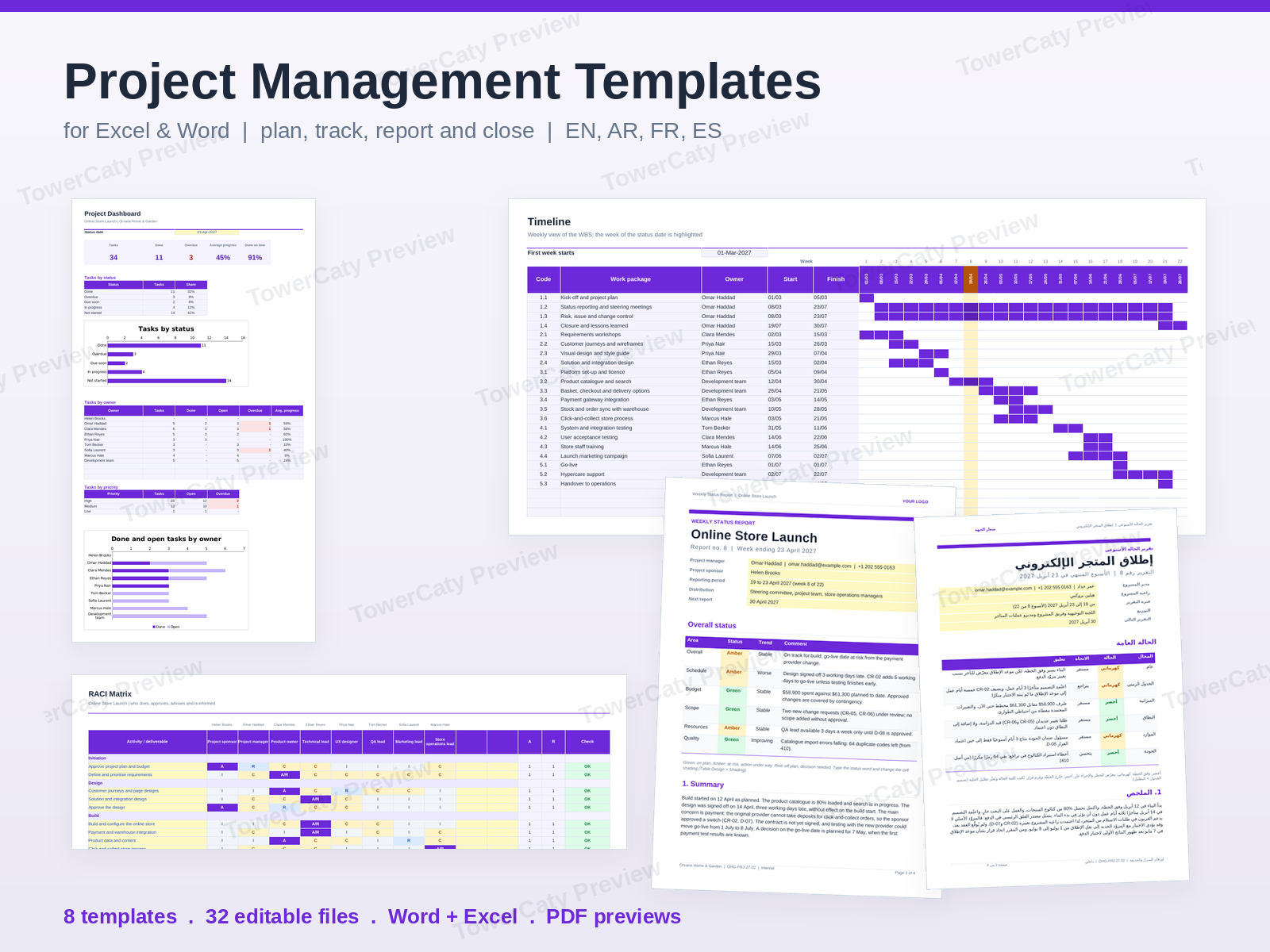
- 01-Project-Plan-WBS.xlsx (Excel): summary with phase dates, effort and budget plus contingency %; work breakdown structure with owners, start dates, working-day durations, WORKDAY end dates, hours, rates and cost; a 22-week timeline drawn by conditional formatting; team rates, capacity and utilisation; milestones with variance and automatic status.
- 02-Task-Tracker-Dashboard.xlsx (Excel): task list with owner, priority, dates, % complete, automatic status (Done, Overdue, Due soon, In progress, Not started), days left and progress bars; a dashboard with 5 KPIs, counts by status, owner and priority, and two native charts.
- 03-Weekly-Status-Report.docx (Word, A4, 4 pages): overall red/amber/green status by area, summary, progress this week and next, milestones, budget, key issues and risks, change requests, decisions needed and a task overview.
- 04-RACI-Matrix.xlsx (Excel): 18 activities in 5 groups against up to 10 roles, colour-coded R/A/C/I drop-downs, an automatic check for one A and at least one R per activity, load per role, and a roles and people sheet.
- 05-Issue-and-Change-Log.xlsx (Excel): issue log with category, priority, owner, target date, days open and overdue flag; change request log with cost and schedule impact and the decision; summary with revised budget, contingency left and revised go-live date.
- 06-Decision-Log.xlsx (Excel): decisions with options considered, reason, decided by, forum, area, status, review date and linked items, plus a summary.
- 07-Meeting-Action-Tracker.xlsx (Excel): meeting log and action tracker linked to meetings, with owner, due date, status and automatic Overdue / Due this week flags, plus a summary by owner with a chart.
- 08-Project-Closure-Report.docx (Word, A4, 7 pages): cover, table of contents, results against objectives, scope delivered and changed, schedule and budget performance, quality and acceptance, lessons learned, handover, open items and sign-off.
Four languages
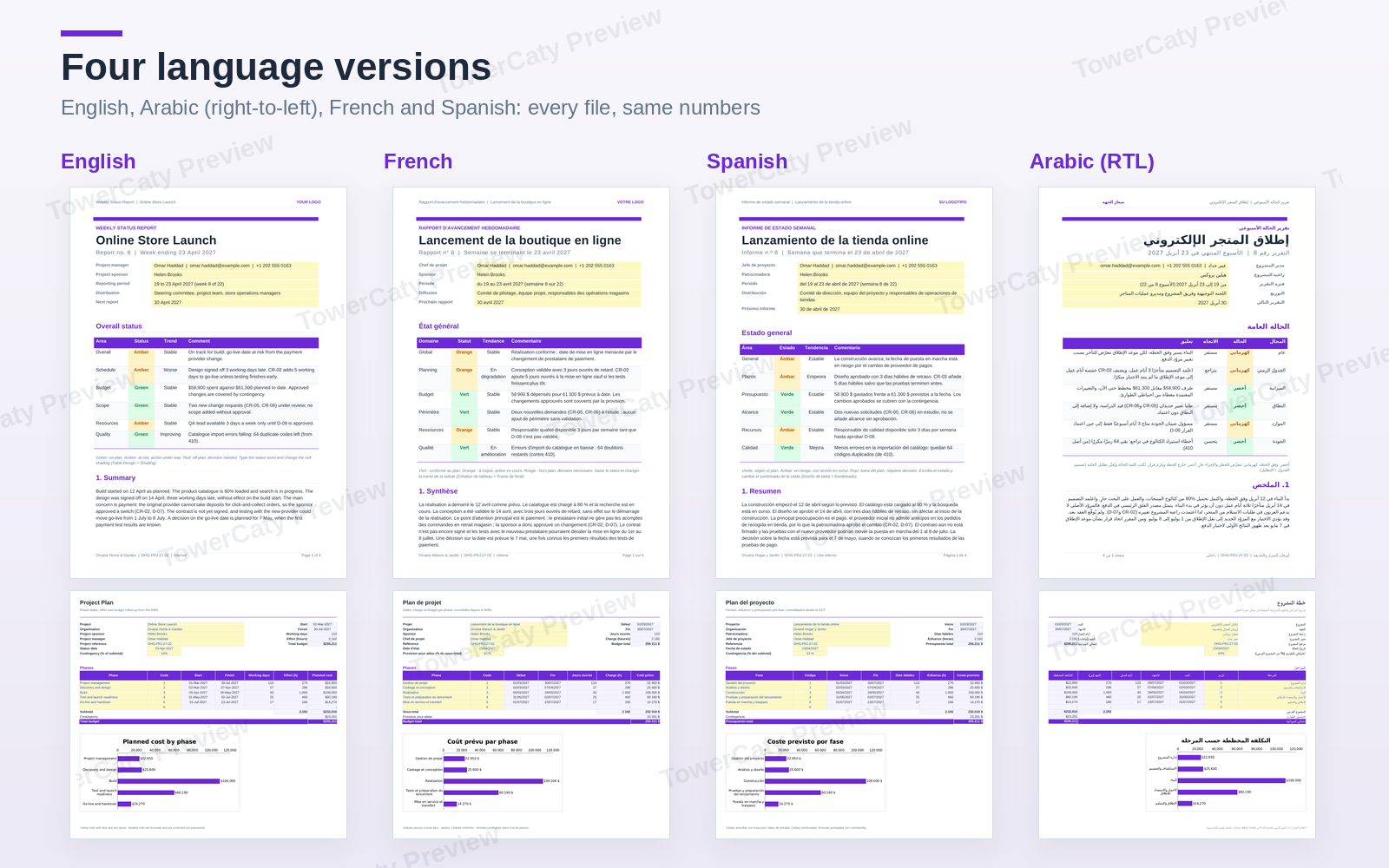
The eight files come in four folders: English, Arabic, French and Spanish. The Arabic version is truly right to left: RTL paragraphs and tables in Word and right-to-left sheets in Excel, with Western digits. French and Spanish use local dates and number formats.
Design and editing
- Clean, neutral design: white pages, slate text and one purple accent (#6D28D9). Arial throughout, so there is nothing to install.
- Excel input cells are yellow with blue text; formula cells are protected without a password; drop-down lists, conditional formatting and print areas are set; no macros.
- Overdue items are calculated from a status date you set, or link it to today with TODAY().
- Real Word styles (headings, body, table style), page numbers, headers, footers and a table of contents in the closure report.
- A "YOUR LOGO" placeholder for your own logo.
Also included
- One PDF preview per language showing every page, sheet and chart.
- A README in English and Arabic on editing, formulas, colours and printing on A4 or US Letter.
All names, companies, figures, email addresses (example.com) and phone numbers are fictional samples. This is a template file pack; no software is included.
What's included
- Complete product files (ZIP)
Languages
The product files and designs come in these languages.
Features
- Eight connected templates built around one sample project with matching numbers
- Project plan and work breakdown structure (WBS) with WORKDAY end dates
- Cost per work package from team rates, with contingency % and total budget
- 22-week timeline drawn with conditional formatting
- Team capacity and utilisation with over-allocation highlighted
- Milestones with working-day variance and automatic status
- Task tracker with automatic status, days left and progress bars
- Dashboard with 5 KPIs and two native charts
- Weekly status report in Word with red/amber/green status by area
- RACI matrix with colour-coded drop-downs and a one-A-per-activity check
- Issue log with days open and overdue flags
- Change request log that updates the budget and go-live date
- Decision log with options, reasons and review dates
- Meeting action tracker with Overdue and Due this week flags
- 7-page project closure report in Word with a table of contents
- Lessons learned, open items and sign-off table in the closure report
- Four languages: English, Arabic, French and Spanish
- Real right-to-left Arabic versions in Word and Excel
- Highlighted input cells, protected formulas without password, no macros
- A4 with US Letter instructions; Arial font only
- One PDF preview per language
- README in English and Arabic
Requirements
Microsoft Excel and Word 2019, 2021 or Microsoft 365, LibreOffice 7 or later, or Google Sheets and Google Docs. Phase dates in the plan workbook use MINIFS and MAXIFS (Excel 2019 or later). No extra fonts are needed (Arial only). No software is included in the package.
Compatibility
Standard Microsoft Office .xlsx and .docx files with no macros, checked page by page in LibreOffice 24.2; they open in Microsoft Office, Google Sheets and Google Docs. Google Sheets does not show the progress data bars, and sheet protection and line breaks can differ slightly in Google and LibreOffice.
Installation
- Download
project-management-templates-1.0.0.zipand unzip it. - Open the folder for your language:
English,Arabic,FrenchorSpanish. - Open the files in Excel and Word and save a copy under your project name.
- Read
README.mdfor the full editing guide and see thePreviewfolder for every page.
User guide
- Start here: fill in the plan workbook (01) and add your team to the Lists sheet of each workbook.
- Excel: yellow cells with blue text are inputs; other cells are protected without a password (Review > Unprotect Sheet).
- Status date: update it every week on the Dashboard or Summary sheet, or type =TODAY().
- Every week: update tasks and logs, then copy the figures into the weekly status report (03).
- Word: shaded text is sample content to replace; update the table of contents with right-click > Update Field.
- Logo: replace "YOUR LOGO" in the header with your logo (Insert > Pictures).
License
| Commercial$19.00 | |
|---|---|
| Projects | 5 |
| Users or sites | 1 |
| Commercial use | Allowed |
| Modification | Allowed |
| Resale | Not allowed |
| Redistribution | Not allowed |
| Updates | 12 months |
| Support period | 12 months |
Pay with PayPal or a debit or credit card. We send your product once the payment is confirmed.
Support & Updates
Support: hello@towercaty.com. Please mention the product name and version (Project Management Templates for Excel & Word 1.0.0), the file and app you use, and a short description of the issue.
Changelog
1.0.0
- Version 1.0.0: first release in the store.
Last Updated
- Last update
- Oct 8, 2026
- Version
- 1.0.0