
CRM Dashboard
From $39.00
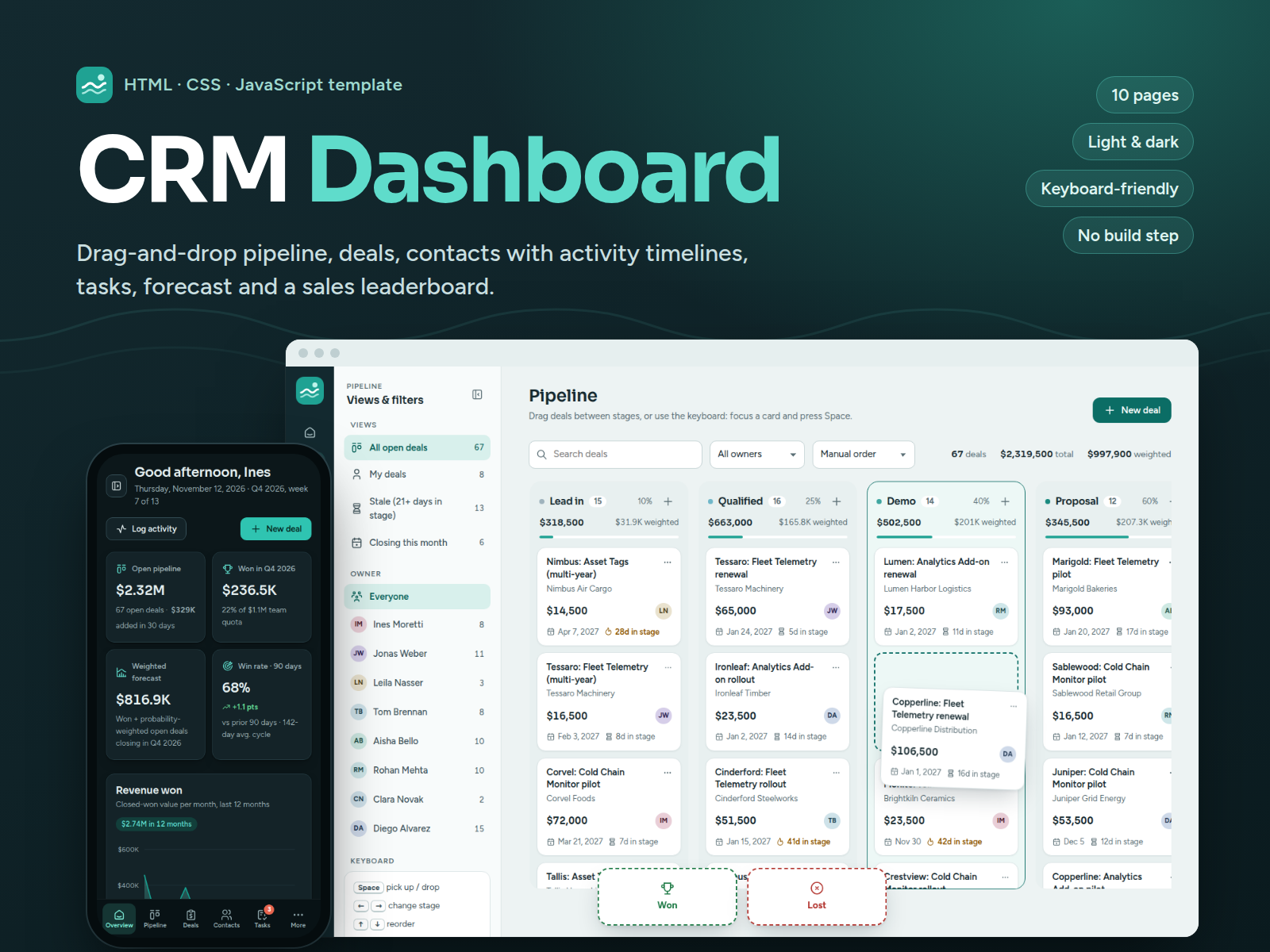
A complete sales CRM front-end in plain HTML, CSS and JavaScript: drag-and-drop pipeline with a full keyboard alternative, deals, contacts with activity timelines, companies, tasks, forecast and a sales leaderboard. Works offline, no build step.
- Secure payment via PayPal
- Instant digital delivery
- Clear licensing
- Support available
Overview
CRM Dashboard is a ready-made front-end for a sales CRM. It ships as ten static pages with realistic sample data for a fictional B2B company, so every screen works the moment you open it: drag deals through the pipeline, log a call on a contact, complete a task and watch the forecast and the leaderboard update.
What's inside
- Overview: today's agenda, four KPI cards, revenue won over the last 12 months, a pipeline funnel, deals closing in the next 30 days, top closers and team activity.
- Pipeline: a Kanban board with drag and drop between stages, Won and Lost drop zones and auto-scrolling. Everything also works from the keyboard: focus a card, press Space, move it with the arrow keys.
- Deals: a sortable table with saved views, filters, search, pagination, bulk actions and CSV export.
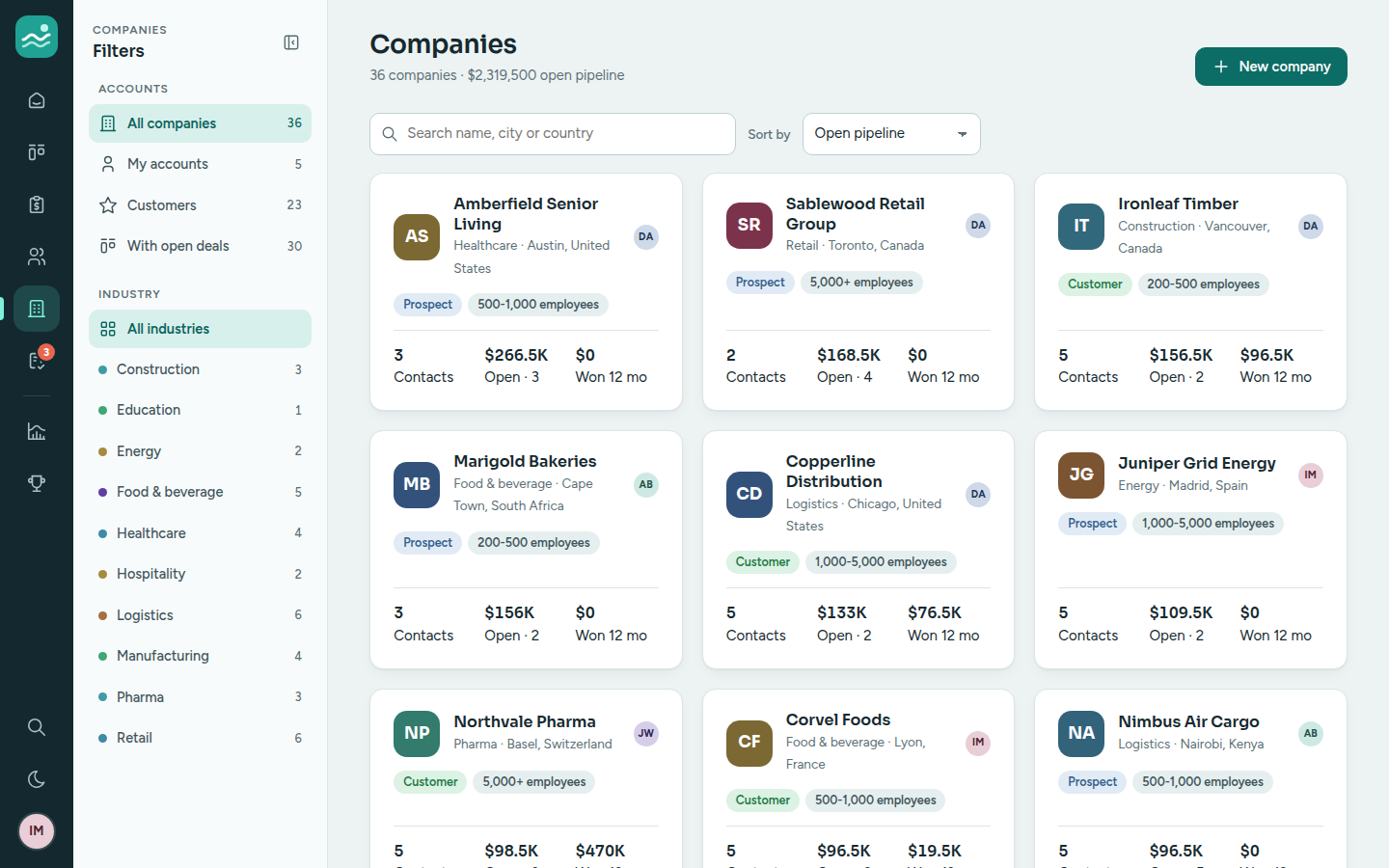
- Contacts and companies: lists with segments, tags and filters, a contact page with an activity timeline and a quick composer, and a company drawer with people and deals.
- Tasks: your tasks or the team's, grouped by due date, with quick complete, undo and rescheduling.
- Forecast: closed won, commit, best case and gap to quota for the quarter, a 12-month stacked chart with a table view, and a per-rep breakdown.
- Leaderboard: a podium and full ranking by revenue, deals won, activities or win rate.
Built to be adapted
Plain HTML, CSS and vanilla JavaScript with no framework and no build step. One configuration file sets the brand, user, currency, pipeline stages, probabilities and quota. All colors are CSS variables for the light and dark themes, and the fonts and icons are bundled, so it runs offline and makes no network requests.
Accessible by design
Landmarks, a skip link, labelled forms with clear validation messages, visible focus, keyboard-friendly dialogs and menus, AA contrast in both themes, table views for charts, and reduced motion when the system asks for it.
Good to know
This is a front-end only: there is no server, database or sign-in, and nothing is sent anywhere. Data from every form is stored in the browser's localStorage (logging an e-mail activity records it in the timeline; it does not send an e-mail), which makes it ideal as a polished UI to connect to your own API, as a prototype or as a sales demo. The interface is in English.
What's included
- Complete product files (ZIP)
Languages
The product description and details are provided in these languages.
Features
- 10 pages: overview, pipeline, deals, contacts, contact detail, companies, tasks, forecast, leaderboard and a 404 page
- Pipeline Kanban with drag and drop between stages, Won/Lost drop zones and auto-scrolling columns
- Full keyboard alternative for the board: pick up with Space, move with the arrow keys, move menu with M
- Touch support: press and hold a card to drag it on phones and tablets
- Deal drawer with stage stepper, details, open tasks, activity history and won, lost or reopen actions
- Deals table with views, filters, search, sorting, pagination, bulk owner change and bulk delete
- Contact page with activity timeline, type filters and a quick composer to log calls, emails, meetings and notes (records only, nothing is sent)
- Companies with industry filters and a detail drawer listing people and deals
- Tasks grouped by due date with filters, quick complete with undo and one-click rescheduling
- Quarterly forecast: closed won, commit, best case and gap to quota, with per-deal forecast categories
- 12-month stacked forecast chart with tooltips, legend toggles, keyboard navigation and a table view
- Sales leaderboard by revenue, deals won, activities or win rate across four periods
- Validated forms for deals, contacts, companies, tasks and activities, with duplicate checks
- CSV export for deals, contacts and the forecast
- Quick search across deals, contacts and companies (Ctrl/Cmd + K) and keyboard shortcuts
- Light and dark themes with a remembered choice and no flash on load
- Realistic fictional sample data: 8 reps, 36 companies, 146 contacts, 215 deals and 54 tasks
- Changes persist in localStorage, with undo on deletes and a one-click demo data reset
- One config file for brand, user, currency, locale, stages, win probabilities and quota
- Plain HTML, CSS and vanilla JavaScript: no framework, no build step, works from a double-click
- Fonts and icons bundled locally: no CDN, no tracking, works offline
- Responsive from 390px phones to wide desktops, with a bottom bar on mobile
- Accessibility: landmarks, labelled controls, visible focus, keyboard dialogs, AA contrast, reduced motion
Requirements
A current web browser (Chrome or Edge 111+, Firefox 113+, Safari 16.2+). No server, database, Node.js or build step is needed: open index.html directly or serve the folder from any static web server. Front-end only: data is stored in the browser's localStorage, and connecting a back end is up to you (the README explains where).
Compatibility
Chrome/Edge 111+, Firefox 113+ and Safari 16.2+ on desktop, tablet and mobile (tested in Chromium). Responsive from 390px phones to 1440px+ desktops. Runs from the file system or any static host (Netlify, Vercel, Cloudflare Pages, GitHub Pages, S3, nginx, Apache). English interface.
Installation
- Download and unzip
crm-dashboard-1.0.0.zip. You get one folder,crm-dashboard/. - Double-click
crm-dashboard/index.htmlto open the dashboard in your browser. No installation or build step is needed. - Optional: serve the folder over HTTP, for example with Python 3:
cd crm-dashboard
python3 -m http.server 4113
Then open http://localhost:4113/.
- To publish it, upload the contents of
crm-dashboard/to any static host (Netlify, Vercel, Cloudflare Pages, GitHub Pages, S3, nginx or Apache) and set404.htmlas the error page.
User guide
Navigate with the icon rail on the left (a bottom bar on phones). The panel next to it holds the views and filters of the current page; on smaller screens open it with the panel button beside the page title.
Move deals by dragging cards between pipeline stages, or onto the Won and Lost zones that appear while you drag. With the keyboard, focus a card, press Space, move it with the arrow keys and press Space again to drop it (Esc cancels). Every card also has a menu with "Move to".
Open a deal by clicking it anywhere in the app. The drawer shows its stage, details, tasks and history, with buttons to edit, mark it won or lost, or reopen it.
Log activity on a contact page: choose call, email, meeting or note, fill in the short form and save. The timeline updates immediately and can be filtered by type.
Manage tasks on the Tasks page: tick a task to complete it (with undo), use the menu to reschedule or edit, and switch between your tasks and the team's.
Read the forecast on the Forecast page: pick a quarter and a rep in the panel, switch the chart to a table, and change a deal's forecast category in the list below.
Search from anywhere with Ctrl/Cmd + K or /, and press ? to see all keyboard shortcuts.
Customize the brand, user, currency, stages and quota in assets/js/config.js, and the colors in the tokens at the top of assets/css/app.css. To restore the sample data, open the account menu (your avatar) and choose Reset demo data.
License
| Personal$39.00 | Commercial$49.00 | Extended$199.00 | |
|---|---|---|---|
| Projects | 1 | 5 | Unlimited |
| Users or sites | 1 | 1 | 5 |
| Commercial use | Not allowed | Allowed | Allowed |
| Modification | Allowed | Allowed | Allowed |
| Resale | Not allowed | Not allowed | Not allowed |
| Redistribution | Not allowed | Not allowed | Not allowed |
| Updates | 12 months | 12 months | Lifetime |
| Support period | 6 months | 12 months | 12 months |
| License key | Yes | Yes | Yes |
Pay with PayPal or a debit or credit card. We send your product once the payment is confirmed.
Support & Updates
Support is provided by TowerCaty through the contact details in your order email. Please include the product name and version (CRM Dashboard 1.0.0), your browser and a short description or screenshot of the issue. The package includes a README with setup, customization and deployment guides, and a changelog.
Changelog
1.0.0
- Version 1.0.0: first release in the store.
Last Updated
- Last update
- Oct 6, 2026
- Version
- 1.0.0